
How To

How To Take A Scrolling Screenshot On iOS 16

Learn How to Take Scrolling Screenshots on iPhone

How To Take A Scrolling Screenshot On iOS 16

Taking a regular screenshot on an iPhone is a common and easy task, but capturing an entire webpage or document that requires scrolling can be a bit more challenging. However, with the latest iOS versions, you can take a scrolling screenshot natively without needing to download any third-party apps.

To take a scrolling screenshot on an iPhone, you can follow these steps:

  1. Open the webpage, PDF, email, or note that you want to capture.
  2. Take a regular screenshot by pressing the side button and volume up button simultaneously.
  3. Quickly tap on the screenshot preview that appears in the lower-left corner.

    Learn How to Take Scrolling Screenshots on iPhone
    Learn How to Take Scrolling Screenshots on iPhone
  4. On the top of the screen, you’ll see options to edit, share, or delete the screenshot. However, to take a scrolling screenshot, you’ll need to tap on the “Full Page” option.
  5. Your iPhone will start capturing the entire webpage or document, scrolling automatically until it reaches the end.
  6. Once it’s done, you can edit, share, or save the scrolling screenshot as usual.
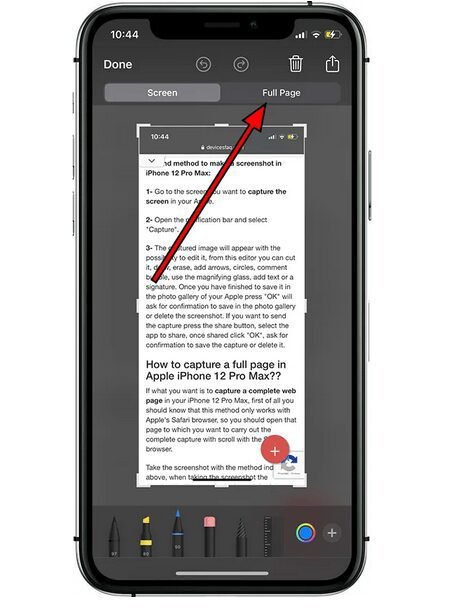
That’s it! With this method, you can easily capture an entire webpage, PDF, email, or note without needing to take multiple screenshots and stitching them together manually.

Adil Sattar

Adil Sattar is a seasoned writer, SEO expert, and technology journalist with years of hands-on experience in the digital content and IT industries. With a passion for uncovering the latest breakthroughs in technology, Adil has dedicated his career to making complex tech concepts simple, engaging, and accessible to a broad audience. Armed with deep expertise in search engine optimization, Adil understands not just how to write great content — but how to make sure it reaches the right audience. His work spans a wide range of technology topics including artificial intelligence, cybersecurity, software development, consumer electronics, and digital innovation. As the founder and lead writer at TechBeams, Adil has built a platform trusted by tech enthusiasts, IT professionals, and everyday readers alike. His unique blend of technical knowledge, SEO acumen, and storytelling ability sets TechBeams apart as a go-to destination for reliable and insightful tech content. When he's not writing or researching the next big thing in tech, Adil is constantly learning, adapting, and staying ahead of the curve in an ever-evolving digital landscape.

Leave a Reply

Back to top button