
Microsoft Introduces Authenticator Lite for Outlook Mobile Apps
Microsoft has introduced a new feature called Authenticator Lite for its Outlook mobile apps on iOS and Android. This feature enhances security and streamlines the multi-factor authentication (MFA) process for Outlook users. In a recent blog post, Microsoft highlighted the benefits of Authenticator Lite, urging users to move away from less secure authentication methods like SMS codes.
According to Microsoft’s research, multi-factor authentications completed through push notifications in the Microsoft Authenticator app are 71% less likely to be compromised compared to those completed via SMS codes. This finding underscores the importance of adopting more secure methods, such as push notifications, for authentication. Authenticator Lite brings this enhanced security to devices that have not yet downloaded the Microsoft Authenticator app.
How Authenticator Lite Works in Outlook Mobile Apps
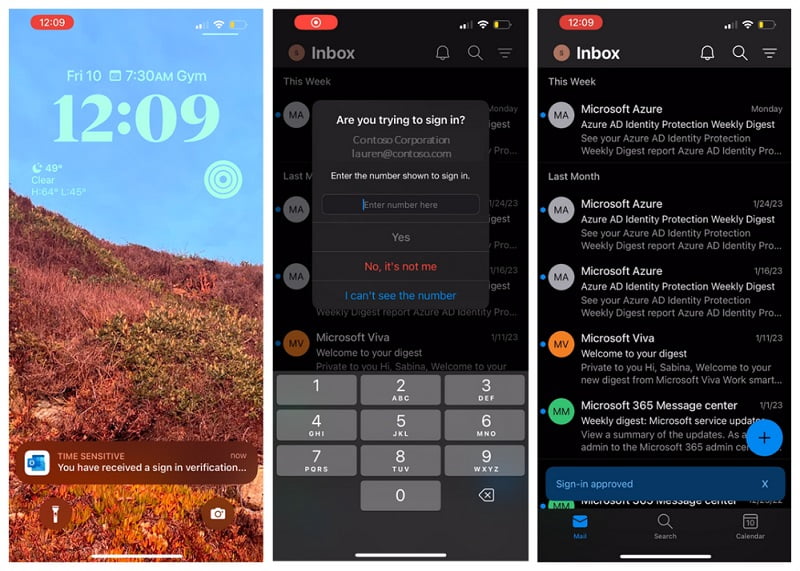
With the latest update to Outlook on iOS and Android, users no longer need to download the stand-alone Microsoft Authenticator app to enable multi-factor authentication for their email accounts. Upon launching the Outlook app after the update, users are prompted to register the app as an MFA-secured device.
Once registered, users no longer have to confirm their identity with a text message or phone number. Instead, they will receive a push notification directly from the Outlook app. The notification will prompt them to enter the corresponding number sent with the push notification.
Enhancing Security with Biometric and Pin Verification
To provide an additional layer of security, the Outlook app can request users to verify their identity using biometric authentication (e.g., fingerprint or facial recognition) or a PIN code if these methods are enabled on their smartphones. This further safeguards access to the app and adds an extra level of protection against unauthorized access.
Looking ahead, Outlook mobile app users can anticipate the introduction of a new feature called Message Reminders. This feature aims to prioritize emails that require a response by placing them at the top of the user’s inbox. By highlighting important messages, Outlook empowers users to stay on top of their email communications more efficiently.
Microsoft’s Authenticator Lite for Outlook mobile apps brings enhanced security and streamlined multi-factor authentication to users. By leveraging push notifications, users can enjoy a more secure authentication process and reduce the risk of compromise. Furthermore, the app’s upcoming feature, Message Reminders, will further enhance productivity and email management for Outlook users.
